Showing posts with label Skills Development. Show all posts
Showing posts with label Skills Development. Show all posts
Friday, 20 March 2015
How to Fade In in Premiere Pro
After the annotations exercise suggesting that I finish the video less abruptly I decided to add a fade out of music. Above is the process I took.

Saturday, 31 January 2015
Instax Research
To correspond with my demographic and the chilled atmosphere of the song I am considering using an Instax camera to take images with.


Different exposures:
I used different exposure levels on the same subject in a naturally light room. Below is how they turned out.

Instax 1: Inside Instax 2: Cloudy Instax 3: Sunny Instax 4: Very Sunny Instax 5: Hi-Key
I think the one that worked best was the Hi-Key, I really like the vibrant colours and I think this suits the nostalgic style. Although it does slightly overexpose certain areas but this 'bad quality' is quite fashionable as instant photos The images 3 and 4 were too dark but this was more to do with light conditions rather than any other factor.
For these images to get on the blog I had to scan them which reduces the quality a little but the darker the image the more the bad quality shows up. Scanning is an effective way to reproduce them digitally.


I will have to scan them in and they will be harder to manipulate on Photoshop but their becoming trendier due to their authenticity and no two images can be the same. Their popularity is being assisted by Taylor Swift's 1989 album which contains Polaroids. Taylor Swift is big in the genre singer/songwriter and therefore it is important that I keep up with trends to keep Matthew P current.
Below are some tutorials that I will be using to learn how to use the camera:
Different exposures:
I used different exposure levels on the same subject in a naturally light room. Below is how they turned out.
Instax 1: Inside Instax 2: Cloudy Instax 3: Sunny Instax 4: Very Sunny Instax 5: Hi-Key
I think the one that worked best was the Hi-Key, I really like the vibrant colours and I think this suits the nostalgic style. Although it does slightly overexpose certain areas but this 'bad quality' is quite fashionable as instant photos The images 3 and 4 were too dark but this was more to do with light conditions rather than any other factor.
For these images to get on the blog I had to scan them which reduces the quality a little but the darker the image the more the bad quality shows up. Scanning is an effective way to reproduce them digitally.
Above I experimented with a scattered effect and I think this works really well. It would be improved if each of the images were of something different. It implies that more is there than what actually is therefore implying that the consumer is getting more for their money.
Above I also tried writing in the white spaces. This is done a lot on instant photos but here I feel it doesn't work. It distracts too much away from the image and there isn't enough room. For this reason I will exclude it from my ancillary products.
Tuesday, 13 January 2015
How I Created the Opening Credits
How I created the Opening Artist Credit - Created with Haiku Deck, presentation software that inspires
Friday, 12 December 2014
After Effects Shortcuts
Here I have documented all the After Effects shortcuts I have learnt during the workshops.
Thursday, 11 December 2014
Premiere Pro CS6 Windows Shortcuts
As I'm new to the software Premiere Pro I have recorded all the shortcuts that I have used. I have documented all the ones I have used so far during my editing.
Monday, 8 December 2014
Sunday, 7 December 2014
How to Convert a Video from QuickTime Movie file MP4 file
While using light leaks I had to convert the file for it to work in Premiere Pro. Above is the method I used.
Saturday, 6 December 2014
How to use the Three Way Colour Corrector
I have used the Three Way Colour Corrector a little within my music video. I use it towards the end to signify a flashback and reference to a different time.
Tuesday, 11 November 2014
Sunday, 9 November 2014
The Layout of Adobe Premiere Pro CS6

To get used to the layout of Premiere Pro as this is my first time using it. I have created a chart that I can refer to that will explain the layout of the programme. This will aid my efficiency and fluency in creating my music video.
Wednesday, 15 October 2014

Monday, 6 October 2014
Green Screen Experiments
I hired the TV studio to experiment with different possibilities for my music video. I really liked the formal setting and I picked up lots of techniques (i.e camera work and chroma key). Despite this I disliked the effect it had and felt like it looked too fake. In some places the proportions were wrong. I feel it would be more successful to film on location as you don't get the authenticity that you would on location. My genre singer/songwriter is an honest genre and I should set this tone with my demographic.
Thursday, 2 October 2014
Time Lapse Experiments
Above I experimented with Time Lapse. I set up a JVC camera in the corner of the kitchen and filmed for 13 minutes. I then proceeded to upload this to Adobe Premier Pro and then sped it up to around 2500%, which was similar to the technique I used during the Door sequence, where I altered the speed through the speed/duration tool.
I really like this technique of time passing as in the video it depicts 13 minutes within thirty seconds and if I want to show any major time movements as I only have two minutes and to truly be able to depict a narrative some elements might have to be time-lapsed to depict progression, especially if I want to fit a day within such a short period of time. As this time depiction is quite vital within being able to fit the narrative in I will explore other techniques which could emphasise a day or hour passing more obviously, as the use of a kitchen doesn't give the viewer any clues in the amount of time that has passed, only sped up an action.
I really like the style of the 'jolty' movement as little movements are abandoned meaning that things move randomly and are considered unimportant to the process, in some ways I like this but overall I feel for my music video that I want to pay more attention to detail so I could slow this down so the movements are there, but I still think that there should be a meaning to every detail to produce an effective composition.
Above is another time lapse taken on my phone. It records for 1 hour and 15 minutes and documents a bus journey. I definitely feel that this needed a tripod and even though I used the stabilizing tool on YouTube there is still movement of the camera which really effects the image. This reminds me of the importance of a tripod.
Above is a time lapse more conventional of one in a music video. I really like this but feel that I got the balance between night sections and day sections wrong. (The original video was around 8 hours).
Thursday, 25 September 2014
Tuesday, 23 September 2014
Filming and Editing Task: Door Sequence
Above we worked in pairs to create a short clip of someone walking through a door to heighten our understanding and fluency of the equipment, filming and the editing on Adobe Premier Pro CS6. We had to delve right into filming without planning so there are lots of improvements we could've made.
At first we had to set up. We decided on a basic set up of a DSLR Canon 1100D and a tripod. Due to not having used the tripod in such a long time we struggled to open it but soon realised that these models have locks to prevent unwanted movements that may occur during filming so after realising that we had to unlock the tripods segments we developed a better understanding. We soon started to comprehend the different knobs and levers and what they controlled such as height, landscape or portrait orientation and tilt. It had also been a while since we had filmed with the DSLR Canon 1100D so therefore struggled to set up this as well. Although we pressed the film button on the back we started to shoot by pressing the shutter button and didn't have the knob turned to the movie setting but the TV setting, so therefore images were being taken rather than videos.




Above are all the images that we took while trying to take a video before we realised that we had the wrong settings.
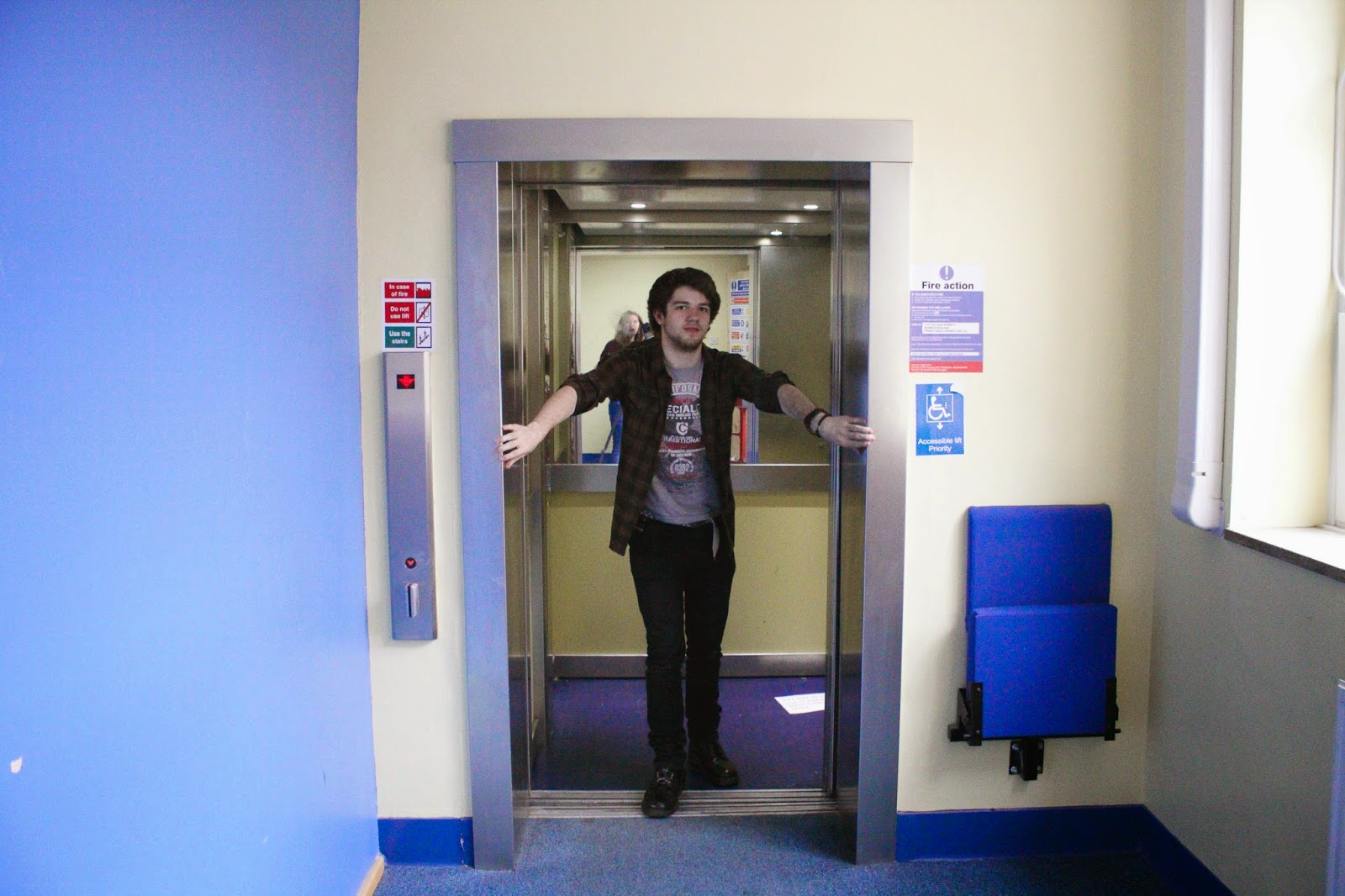
As we had such a short time to shoot we had no opportunity to check the location for anything that could cause any problems during filming which meant that we never noticed the reflection in the mirror of the lift, which ruins the professionalism of the video and makes the viewer aware of the whole process of filming and editing which taints the idea of continuity editing as it draws attention to the process, also during a shot in the lift and outside the lift a reflection is visible which although it isn't as clear as the mirror inside the lift it does have an effect and can possibly draw some attention towards the process, therefore making it not as effective as it doesn't give the viewer the experience as if they're there as they are aware that this is now all composed rather than a snapshot. For this reason I will need to do a proper location scout to make sure that none of this can happen as it can blemish my music video.


Above is the camera reflection before editing which depicts the camera as obvious and although after editing it can be seen it isn't as evident after using continuity editing to cover it up. Due to it being less palpable it is less likely to be noticed, therefore less likely to ruin the effect.
As well as not being able to scout the locations as well as we would've wished this meant that the second door we used couldn't have been done in as much detail as we would've aspired to have. For example the second door was a main access point for the library so therefore we couldn't be there for long periods of time and pay as much detail as we would've preferred to produce a more fluent and intricate progression to the video. A piece of detail that we could've added was a match on action or a graphic match due to the identical movement between the two doors. As well as this the second door was fitted with a sensor which prevented us from having control over the door and getting a detailed suitable close up, due to every time we tried to get close the door would try and open and then remain open.
Due to the span of shooting being over two days this allowed for controlled changes as Brandon was unshaven for the first part of filming but on the second day he was cleanly shaven, meaning this restricted use of camera angles from the front or the previous day of filming as this adjustment would be apparent. This makes me realise that to keep the conditions the same I will have to agree with the actor not to modify anything that would be distinct, as well as visible, and I will also have to try and get all my shots in as much time as possible to prevent these changes from affecting my music video.
Going back to the use of equipment, aside from the DSLR, we only had a tripod but this limited our lower shots of the feet so therefore the shots of the feet are being held freehand and not that level, still or precise, for this reason I will need to plan closely my shots as a circular stedicam was needed for this and might be needed for the my music video, if I had used a steadicam then the video would've appeared to have been more professional and fluent whereas the wobbly nature of the shot appears to be almost DIY and inefficient.

Above is the a print-screen from the wobbly shot of the feet.
When we returned from filming we began to edit but one thing that we did notice was that some shots weren't as in focus as we desired, when we used the DSLR we had it set on Auto focus which could've been the reason for this but the visual quality doesn't meet a great standard and gives an unprofessional taint. To find the cause of this I will experiment with focus on the DSLR's and try manual focus and different techniques to do with focus, but if I don't adjust and find the cause then this could mean the a load of footage from my music video could be shot but then be redundant due to the footage being out of focus.

Above is a shot that is out of focus, even though it's on the highest quality possible.
Another thing we noticed after returning from filming is that in some shots the tripod wasn't positioned level which therefore ruins the fluency and professionalism of the video, this can be altered on Adobe Premier Pro but I will have to research and develop my skills on how to do it, but generally the lesson learnt is that I should always check as the amount of time I could spend on trying the alter and tilt the video could be spent on something that would improve the overall quality, professionalism and narrative.
Above is a tilted shot due to the tripod not being level, I will have to refer to the spirit levels on the tripod to check when filming in future.
When we started to edit we wanted to introduce our video through text and title screens so we set three title screens up. Only they aren't level and they jolted around the screen a tiny bit which gives an unprofessional style to the opening and makes the viewer's expectations lower due to us not picking up on tiny details, I will have to research more on Adobe Premier Pro to see whether the method I used was the most effective or if there was another more professional method that could've been applied, or whether I will just have to pay more attention to detail in future.


Above are print screens of the opening titles, which we were inspired by the opening credits on other music videos such as;


These come from a range of genres, including singer/songwriter (Nina Nesbitt), which prove that these are popular ways to introduce a song and is quite common and I prefer these techniques over our just simple black background, I will research on how to produce these fluent title sequences as these are considerably more effective than a black screen as they can set the scene and be paired with an establishing shot to set the tone of the music video.
Below is how I added our black background credits and title:

Above I added a title.

Above I added a title and repeated this three times to present the title sequence.
To get all the shots we needed we had to repeat parts, for example the walking to get the feet moving, but this meant that Brandon walked at different paces to each footage so I had to slow down and speed up parts so it would look like he had only walked once as part of continuity editing.


Above I changed the speed/duration from 100% to 150% to increase the speed of the footage to produce one consistent pace.
I also learnt how to add music to footage using the programme Adobe Audition by ripping the track from the CD and then putting it into Adobe Premier Pro. I feel that the music matches the edit and adds a positive vibe due to the use of a positive key. Although one way I could've improved is by adding a fade to the music so the ending isn't so abrupt.
Another thing I learned was how to export the movie as a Windows Media file so that it would upload to YouTube.


I then progressed to upload it to YouTube

Monday, 8 September 2014
Subscribe to:
Posts (Atom)